
Did Someone Request Ownership of Your Google Business Profile?
Learn what to do when an unknown someone requests ownership of your Google Business Profile. Since managing your Google Business Profile (formerly Google My Business) is an important component of Local SEO, it's important to actively manage and optimize your GBP profile and always maintain ownership of it.
"You've received an ownership request" Email from Google
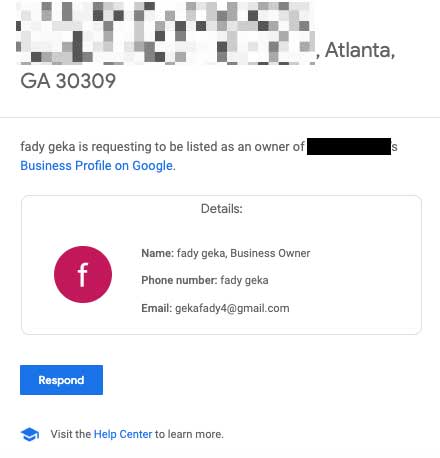
It's a bit disconcerting to get an email with the subject line - "You've received an ownership request" - from Google Business Profile stating that an unknown person is requesting ownership of your Google Business Profile. We see this happen from time to time to clients.
How is it possible that anyone can try and claim your profile?
Well, Google makes it fairly easy by including an "Own this business?" link right on the Google Business Profile.
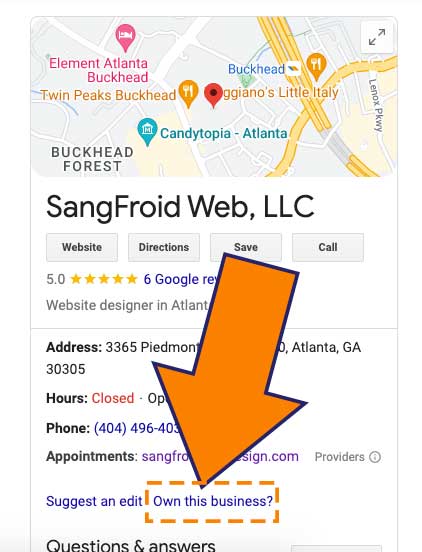
Why?...why does Google make it this easy for people to try and claim my GBP?
My opinion is that Google makes it relatively easy for people to claim profiles because so many legitimate business owners lose access to their GBP profiles along the way.
They may lose access for any of the following reasons:
- A 3rd party manages their GBP profile on their behalf, and when they stop working with the 3rd party, they lose access.
- They lost access to the Google account they used to claim it originally.
- They may have never claimed their Google Business Profile in the first place, and someone else did.
New for 2026: The Follow-up Phone Call Scam
Scammers have become more sophisticated. A common tactic now involves sending the ownership request and then calling your business shortly after, pretending to be 'Google Support.' They may claim there is a security issue and ask you to 'click the link in the email we just sent to verify your identity.'
Google is very clear about phone security. According to their official safety guidelines on fraudulent calls, Google will never call you to discuss your profile's ownership or security. Their advice is simple: If someone calls you pretending to be from Google regarding your account access, hang up immediately.
Why is someone trying to claim my Google Business Profile? Is it a scam?
In our experience, it is either an innocent mistake by a person who thinks they are claiming the correct business, or, more commonly, a scammer looking for an opportunity to hijack a profile.
Reasons why someone would try to steal or hijack a Google Business Profile include:
- To demand a ransom for return of the profile
- To hurt your business by changing important information like your website and phone number or by marking it as permanently closed (perhaps by an unscrupulous competitor)
- To steal your traffic and reviews by claiming the profile and changing information to reflect a new business
What to Do When Someone Requests that You Transfer Ownership of Your Google Business Profile
What should you do when you receive an email requesting ownership access of your GBP profile or account?
When someone you don't know requests ownership of your Google Business Profile, do not ignore the email. According to Google’s official documentation, you have only 3 days to respond. If you do not reject the request within that window, the requester may be granted the ability to claim and verify the profile themselves.
- First make sure the link in the email is not a phishing link by hovering over the 'Respond' button and verifying it goes to a 'business.google.com' link and not some random website. Phishing links are a whole separate problem, and if the email is actually a phishing email, then you can safely ignore it. (Did you click on a phishing link?...Learn what to do.) In 2026, phishing links are harder to spot because scammers use AI to make very convincing emails. Scammers can now also create very convincing fake login pages. Instead of clicking any buttons in the email, the safest way to manage a request is to open a new browser tab and go directly to business.google.com. If there is a legitimate pending request, it will appear in your dashboard there.
- Click on the 'Respond' button to respond and follow the steps to deny or reject the claim. Make sure you are logged into the correct Google account that is the current owner of the profile. Some people also say it's fine to ignore these emails, but I prefer to be proactive. Because Google now uses a short 3-day window for owner responses, failing to hit the 'Reject' button could inadvertently hand the keys of your profile to a scammer.
- Do not email or call the person. Ignore the person, and just reject the request via the correct pathway. If you engage directly via email, then the person knows they have a live person on the other end and may become more persistent in contacting you directly. When they make a request for ownership of the profile at Google, they cannot see the email address to which the notification goes. If you email them directly, you are giving them more information to use against you. Do not contact them directly.
- If it keeps happening, as mentioned in this support thread on the subject, you can report it to Google using one of these forms:
Has someone ever tried to claim your Google Business Profile? How did the situation get resolved for you? Share your story in the comments.


Somebody claimed my business profile and refuses to give it up!!
As a physician, I am repeatedly telling Google this is FRAUD!! Impersonating a doctor is ILLEGAL and no one will help me!
I sent every document I could think of – my medical license, the lease on my building, my CV (resume)… had them call a colleague (they never did) and STILL they refused to transfer my profile back to me! How is this legal?!!! Can Google be this stupid??